Spotify Integration
Setup Guide
Hi! Follow the steps below to connect Spotify to TouchDesigner.
Important: First, make sure you are using Google Chrome. If you don't use Chrome, hit me up on IG via DM!
1
Open Command Prompt (cmd) and paste the following command to launch Chrome in debugging mode:
CMD
"C:\Program Files\Google\Chrome\Application\chrome.exe" --remote-debugging-port=9222 --user-data-dir="C:\temp_chrome_debug"2
In the newly opened Chrome window, go to Spotify and turn on the lyrics view.
3
Open a new tab and go to http://localhost:9222/json. Look for something that looks like the image below (Note: The link changes after every chrome restart. Remember to copy the new one!):

4
Copy the link, but make sure to remove the port number (as shown in the image below):

5
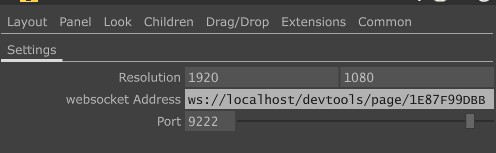
Use my .tox file in TouchDesigner and fill in the data exactly as shown here: